
Access decisions cannot wait. When a new hire requires system access on day one, a finance lead requests emergency permissions to close the quarter, or a security team needs to revoke access to a compromised account, every hour of delay represents a productivity loss and a potential security risk.
Yet most identity governance and administration (IGA) tools still require approvers to stop what they are doing, log into a separate console, and navigate to an interface they may use only a few times a month. This friction is a primary reason access approvals get stuck.
Saviynt Identity Governance App for Microsoft Teams closes that gap by bringing enterprise identity governance directly into the collaboration platform your organization already lives in.
Why identity governance belongs inside Microsoft Teams
Microsoft Teams has become the default workspace for a huge share of the enterprise. Roughly four in ten organizations use Teams as their primary collaboration tool, and it's tightly stitched into the Microsoft 365 stack most enterprises already depend on.
That makes Teams a natural home for the decisions that govern access to those same systems. When approvals, reviews, and identity alerts surface in the same place as chats, meetings, and project work, governance stops being a side errand and becomes part of how work already happens.
The hidden costs of legacy IGA workflows
Before getting into what the integration does, it's worth naming the problems it solves. Across customer deployments, we see the same operational drag show up again and again.
1. Unfamiliar interfaces slow down approvers
New employees take time to become proficient with specialized identity management consoles. Senior leaders (the people making the highest-impact approval decisions) often use these tools so infrequently that they rarely build fluency. The result is approval bottlenecks and decisions that sit, waiting for decision-makers to refresh their memory about how the console works.
2. Executives are mobile-first, and traditional IGA isn't
Busy decision-makers work from airports, hotel lobbies, and between back-to-back meetings. Legacy identity tools were designed for the desktop, and the mobile experience often isn't good enough to drive a confident one-tap decision. Critical approvals get deferred until someone is back at a laptop.
3. Email is convenient, but it’s also risky
Email-based approval notifications are easy to set up and require no training. But there are real downsides:
- Lost in the inbox. Urgent identity tasks blend into a sea of unread messages and get missed entirely.
- Forwardable links. Approval links can be passed to people who shouldn't act on them.
- Phishing exposure. Attackers spoof identity approval emails because they know users have been trained to click them quickly.
Email still has a role, but it shouldn't be the only channel for time-sensitive access decisions.
What Saviynt for Microsoft Teams delivers
Saviynt Identity Governance App for Microsoft Teams brings the core identity governance experience (access requests, approvals, certifications, and alerts) directly into the Teams interface, on desktop and mobile.
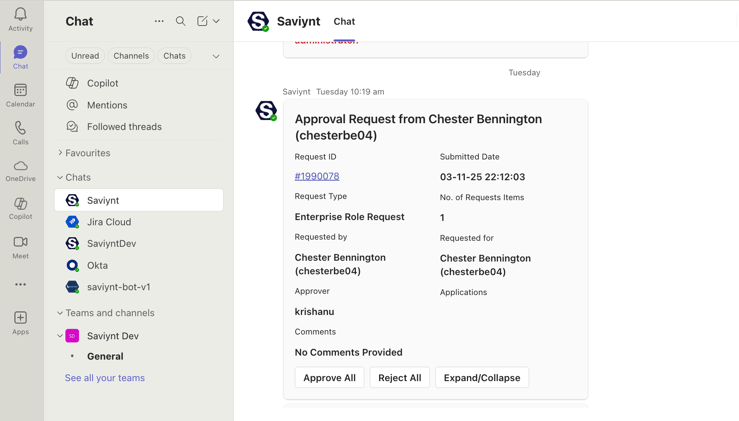
Native Teams cards with one-click approvals
Approvers receive context-rich adaptive cards that show everything needed to make a decision: who's requesting access, which entitlements are involved, the associated risk, peer-group comparisons, and any policy violations. A single tap approves or denies. The experience is identical on Teams mobile, so an approval during a flight or between meetings is genuinely a one-tap action.
Intelligent notification prioritization
Not every identity event deserves the same urgency. Saviynt routes critical security alerts and emergency access requests to dedicated Teams channels so they stand out from routine approvals. Security operations teams see what they need to act on first, without digging through email threads.
A familiar interface with enterprise-grade security
Users stay in the Teams environment they already know. There are no new consoles to learn and no additional logins to remember. Authentication, audit logging, separation-of-duties enforcement, and all the other governance controls of the Saviynt Identity Platform continue to run behind the scenes.
No context-switching
Whether users are in a meeting, collaborating in a channel, or scanning notifications on mobile, identity decisions slot into the workflow already in progress. Governance becomes part of the work stream instead of an interruption to it.
Who benefits from Teams-native identity governance
Teams-native identity governance benefits everyone. Specifically, Saviynt’s Identity Governance App for Microsoft Teams enables:
- Approving managers to clear access requests in seconds without leaving their main workspace.
- Executives and business leaders to make confident decisions from mobile with the full context in front of them.
- Security and SOC teams to see emergency access requests and high-risk events in dedicated channels, not buried in email.
- Compliance and audit teams to get a complete, timestamped record of every decision and the context that drove it.
- IT and identity administrators to reduce help-desk tickets and approval escalations.
What's coming next
This launch is the foundation for a broader vision of collaborative identity governance. On the near-term roadmap:
- Natural-language identity actions in Teams. Request access for yourself or a teammate, delegate approval responsibilities, or check on a pending request using plain English. No console navigation required.
- Teams as the central hub for identity notifications. New-hire alerts, role-change notifications, and access-recommendation prompts surface directly in Teams with intelligent suggestions attached.
- Expanded conversational governance. Deeper integration between Saviynt's AI capabilities and the Teams experience, so approvers get risk context and recommendations the moment a decision lands.
Ready to bring identity governance into the flow of work?
Saviynt for Microsoft Teams enables identity governance from within the workspace your team already uses every day. Faster decisions, fewer missed approvals, less phishing exposure.
Contact your Saviynt representative to see Saviynt for Microsoft Teams in action.