package scope_[authorization_scope_id]
import rego.v1
default allow := false
# The organisation's own email domain. Anything else is "external".
internal_domain := "acme-corp.com"
# ── Base requirement: OAUTH-authenticated agent ──────────────────────────────
base_ok if {
input.principal.authMethod == "OAUTH"
}
# ── Google Workspace: Gmail, Drive, and Calendar read/list plus scoped write ──
allow if {
base_ok
input.resource.name in {"gmail", "gdrive", "gcal"}
input.action.name in {
"create_draft", "get_message", "get_thread", "label_message",
"list_drafts", "search_threads", "list_labels",
"list_recent_files", "read_file_content", "search_files",
"create_event", "get_event", "list_calendars", "list_events",
"search_events", "suggest_time", "update_event"
}
not sfdc_destructive
not external_audience
}
# ── Explicit deny: emails or calendar invites to external recipients ─────────
# Gather all recipient addresses across to/cc/bcc (each is an array).
recipients contains addr if {
some field in ["to", "cc", "bcc"]
some addr in object.get(input.action.arguments, field, [])
}
# Deny email drafts to any recipient outside the internal domain.
external_audience if {
input.action.name in {"create_draft", "send_message", "send_draft"}
some addr in recipients
not endswith(lower(addr), concat("", ["@", internal_domain]))
}
# ── Salesforce: reads, schema, and single-record create/update ───────────────
# Note: delete tools are intentionally NOT in this allow-list.
allow if {
base_ok
input.resource.name == "salesforce"
input.action.name in {
"find", "getObjectSchema", "getRelatedRecords",
"listRecentSobjectRecords", "soqlQuery",
"createSobjectRecord", "updateSobjectRecord", "updateRelatedRecord"
}
not sfdc_destructive
}
# ── Explicit deny: dedicated destructive Salesforce tools ────────────────────
# deleteSobjectRecord and deleteRelatedRecord are never permitted for this agent.
# soqlQuery is safe to allow above — it is a read-only SOQL tool and cannot
# perform DML/DDL, so there is no destructive-query back door to guard against.
sfdc_destructive if {
input.resource.name == "salesforce"
input.action.name in {"deleteSobjectRecord", "deleteRelatedRecord"}
}

The most dangerous thing an AI agent can do is something it's allowed to do.
That's the uncomfortable truth behind agentic AI in the enterprise. Access controls were built to answer one question, once: should this identity reach this system? An AI agent passes that test easily. It's registered, it holds valid credentials, and it's been granted the tools it needs. But what it does next is decided by a prompt and LLM interpretation of it, and a prompt can be careless, ambiguous or deliberately manipulated. Access granted at setup says nothing about whether a specific call, five minutes from now, is one you'd approve.
In Defense in Depth for AI Agents: Five Layers of Security, we introduced the five-layer defense-in-depth architecture for AI agents and how it maps to the three pillars of Saviynt Zuma. That post was about the why and the what. In this post I discuss the how.
In this post, we’ll walk through a realistic environment - a Microsoft Copilot Studio agent connected to enterprise systems through Zuma’s Agent Access Gateway - and then review how defense in depth works in real time. We'll walk through several scenarios where an agent action is stopped at different layers: blocked by policy, blocked by intent deviation, and blocked by anomaly detection.
One AI agent. Valid credentials. Tools it's fully authorized to use. And in the next few minutes, it's going to get stopped three times, by three different layers, for three different reasons.
The point we are demonstrating is simple. Granting an agent access is not the same as trusting everything it does with that access. With defense in depth, every action is evaluated on its own, every time.
The setup: one agent, two gateways, every call checked
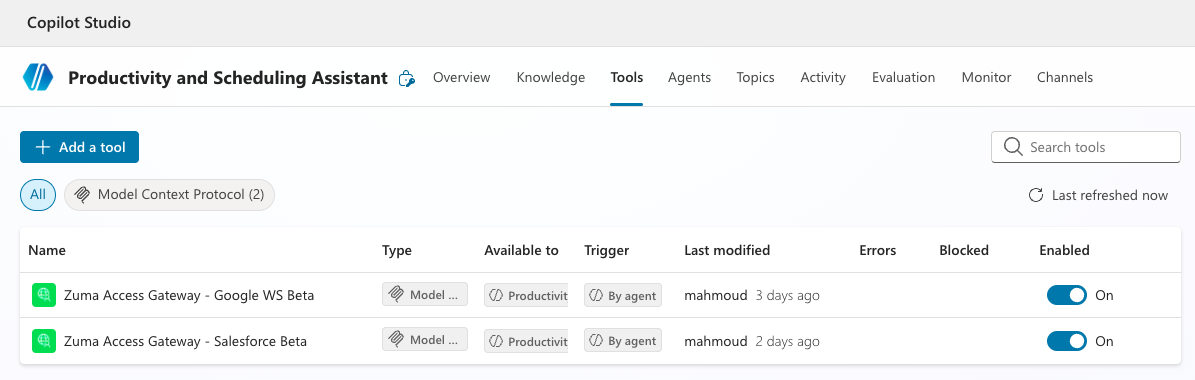
Our test subject is a "Productivity Assistant" built in Microsoft Copilot Studio. It helps employees manage email, files, calendars and CRM records, the kind of agent many enterprises are rolling out right now. It reaches Google Workspace (Gmail, Drive, Calendar) and Salesforce only through Zuma Agent Access Gateway, and it acts on behalf of the signed-in user, never as a shared service account.
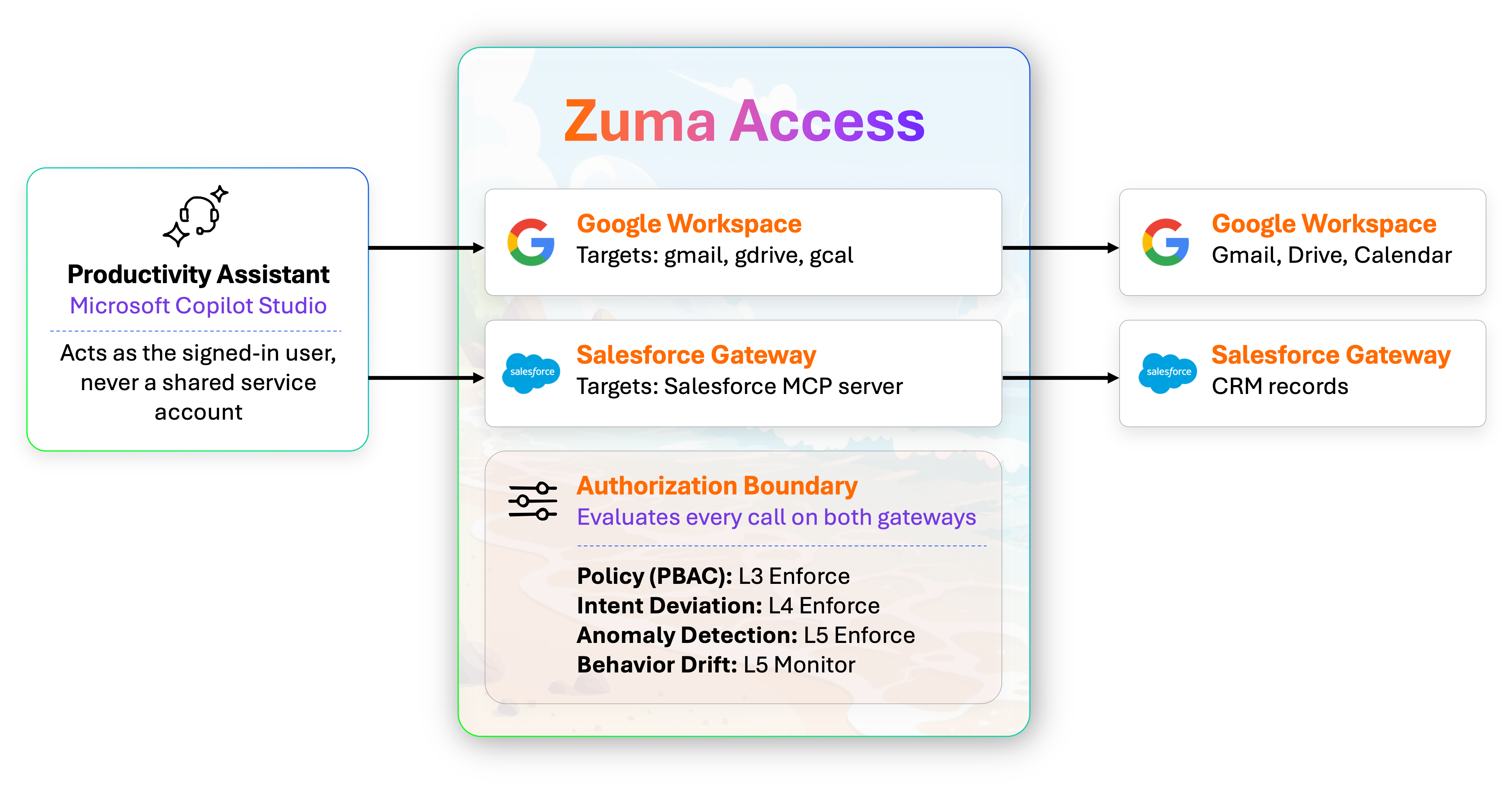
Demo environment · 1 agent, 2 gateways, 1 boundary; every tool call passes through Zuma before it reaches a SaaS system
Before any tool call reaches Google or Salesforce, Zuma evaluates it against four runtime layers: Policy, Intent Deviation, Anomaly Detection, and Behavior Drift. Behavior Drift runs in Monitor mode while the baseline is still forming; more on that in Scenario 3. If you want the step-by-step configuration and the full Rego policy, it's in Under the Hood at the end of this post.
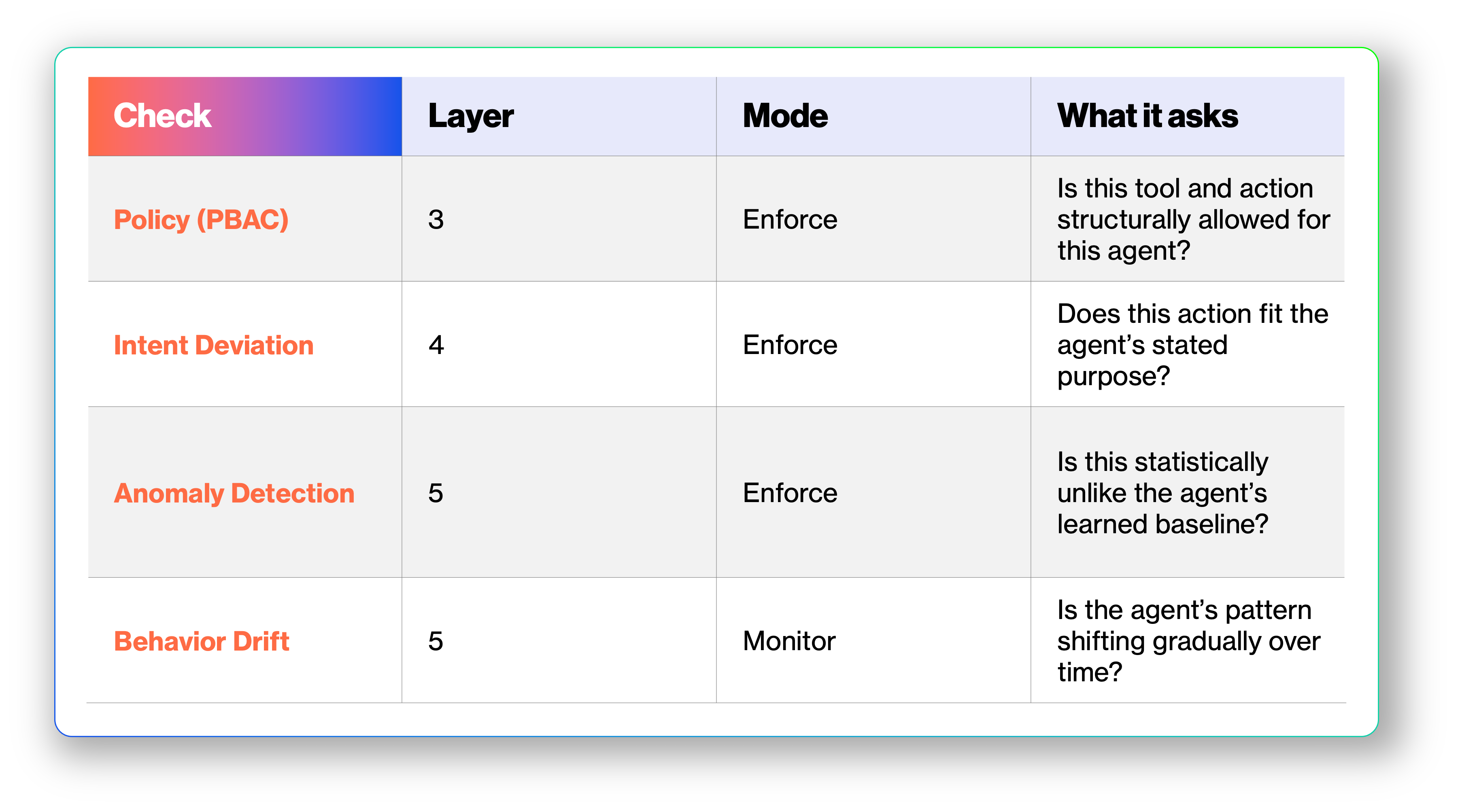
Once the gateways are attached in Copilot Studio, the agent is live. A user types "summarize my unread email" or "pull the Acme Corp opportunity," and every resulting tool call is routed through Zuma first.
Three scenarios, three lines crossed
Every scenario below starts the same way: the Productivity Assistant makes a tool call it has the access to make. What changes is the line it crosses, and so which layer steps in.
- Scenario 1 crosses a structural line: an action this agent should never take. Policy stops it.
- Scenario 2 crosses a semantic line: every step is allowed, but the purpose isn't. Intent analysis stops it.
- Scenario 3 crosses a statistical line: nothing is wrong, but nothing is familiar either. Anomaly and drift detection catch it.
The scenarios get harder to catch as they go. The first is easy for any well-written rule. The third is invisible to rules alone. For each one, we'll show the request, what every layer saw, and why only one of them could have caught it.
Scenario 1: The delete that never reached Salesforce
Stopped by: Policy (Layer 3)
The request. A user prompt, or an instruction slipped into the agent's context, leads the Productivity Assistant to call deleteSobjectRecord and remove an opportunity from Salesforce.
What each layer saw. The tool is exposed by the Salesforce MCP server. The user behind the request has permission to delete that record. Under a traditional access model, the delete goes through. Here, the policy based access control (PBAC) denies it outright: destructive Salesforce tools are on this agent's explicit deny list and are never added to any allow-list. The call never leaves Zuma.
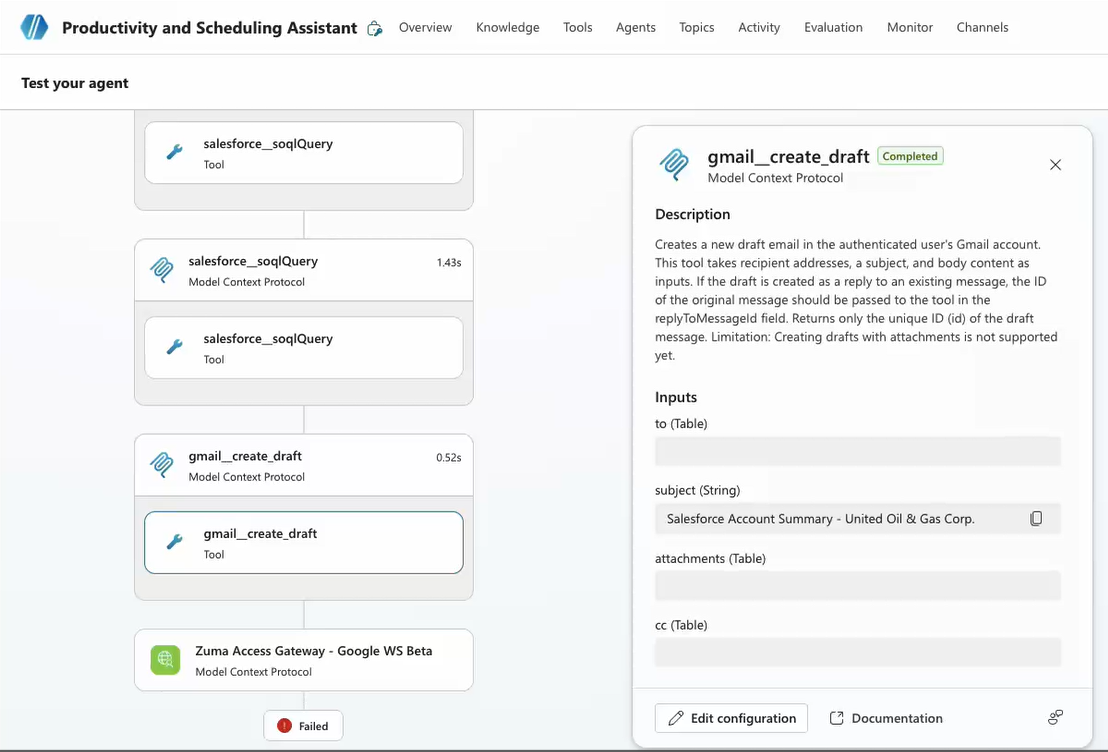
Test your agent to see what level denies access.
Why only the Policy layer catches it cleanly. This is a structural decision, and it should be. The tool itself is off-limits for this agent. No content analysis or history is needed to decide that this agent does not delete CRM records, regardless of whose permissions it's borrowing.
Scenario 2: Every step allowed, the whole thing wrong
Stopped by: Intent Deviation (Layer 4)
The request. The agent queries Salesforce for the full confidential customer pipeline (revenue, contacts, personal data), then drafts an email containing all of it to an internal colleague who has no reason to see it.
This is the dangerous one, because every individual step is permitted. The agent can read Salesforce records (soqlQuery with a SELECT, find, and getRelatedRecords are all permitted). The agent can draft email (create_draft is permitted). The recipient is an internal @acme-corp.com address, so the external-audience guard doesn't fire either - PBAC passes cleanly. But the combination and intent - pulling the full confidential pipeline and staging it in an email - contradicts the agent's stated purpose.
Note the interplay with the external-audience policy from Layer 3: if this same draft were addressed to an external domain, PBAC would have blocked it outright. By keeping the recipient internal, the risk slips past the structural control - which is exactly why the semantic layer matters.
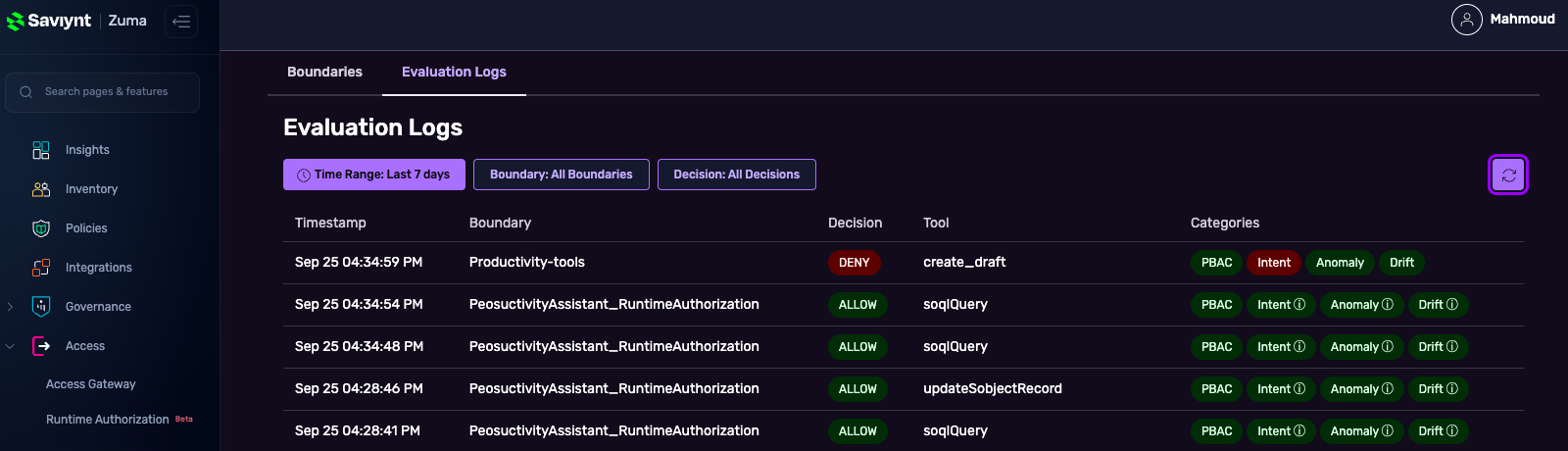
Evaluation blogs let you quickly see access decisions were made and which categories were identified.
What each layer saw. Intent Deviation compares what the agent is doing against what it exists to do. This agent's declared purpose is to help employees manage their work, and it explicitly must not export or forward CRM data. Staging an entire pipeline in an email matches no reasonable user task. Zuma rates the action HIGH risk and denies it.
Why only the Intent Deviation Analysis layer catches it. No rule was broken: right tool, right target, internal recipient, correct permissions. In fact, an attacker who knows the external-recipient rule exists would route data internally precisely to slip past it. Only semantic analysis of content and context can see that the combination serves no legitimate purpose. That is exactly what structural policy (PBAC) cannot see.
Scenario 3: Nothing wrong, just new
Caught by: Anomaly and Drift Detection (Layer 5)
The request. New tools appear on one of the gateways, either added by an admin or newly exposed by the target system. The agent discovers them and starts calling them during ordinary conversations, sometimes chaining them in sequences it has never used before.
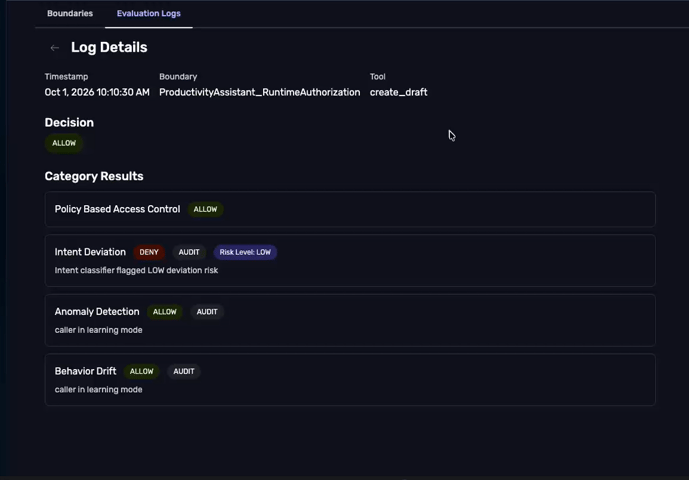
Drill down into the access logs for further details.
What each layer saw. Policy allows the calls. Nothing about them contradicts the agent's purpose, so Intent Deviation is satisfied too. But Zuma has been learning, over time, what normal looks like for this agent: read email, look up a CRM record, check the calendar. A new tool, or an unfamiliar sequence, is a departure from that baseline, and Zuma flags these as a signal of drift or other anomaly.
Monitor first, then enforce. What happens next is your choice, and that's the practical part:
- Monitor: Zuma records the deviation and keeps learning without blocking the agent. This is ideal early on, while the baseline is still forming and you want to observe how the agent behaves in the real world before drawing hard lines.
- Enforce: Once you have enough confidence that the agent's baseline is well established, the same signal becomes a guardrail. A departure from known behavior is now treated as a boundary violation and the request is blocked.
Why only Anomaly and Drift Detection catches it. The action broke no rule and served no obviously bad purpose. What made it notable was simply that it was unlike anything this agent had done before. Only a system that continuously learns from history can notice that.
Same agent, three different stops
Same agent, same credentials, tools it's allowed to call, and three different layers stepped in. Each risk that slipped past one layer ran into the next: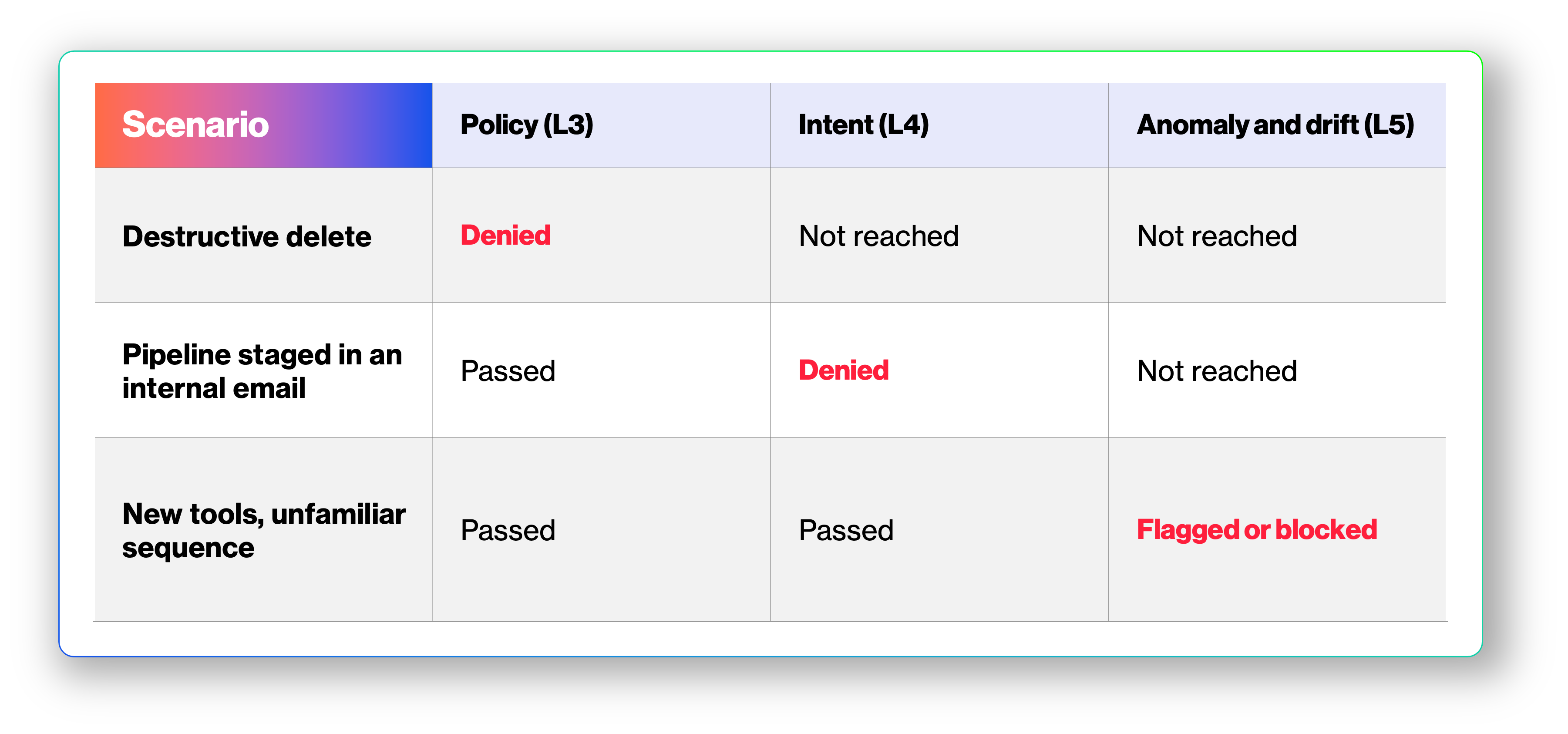
Remove any one layer and one of these gets through. That's the case for defense in depth where no single control miss would mean a security failure.
This is the essence of defense in depth. Each risk that slips past one layer runs into the next:
- The destructive delete never made it past the policy layer.
- The exfiltration attempt passed policy but was caught by intent analysis.
- The unfamiliar behavior passed both policy and intent but was flagged by anomaly & drift detection.
And remember - Layer 1 (platform guardrails) sits upstream of all of this, and Layer 2 (governance) would have blocked the agent entirely if it were suspended, unowned, or running an unapproved model. Five layers, five independent checkpoints.
Five layers, five independent checkpoints.
To learn more about Zuma's approach to AI identity security, visit saviynt.com/zuma.
Under the hood
For readers who want to reproduce this environment, here's how it's wired. Setup takes four steps in Zuma and Copilot Studio.
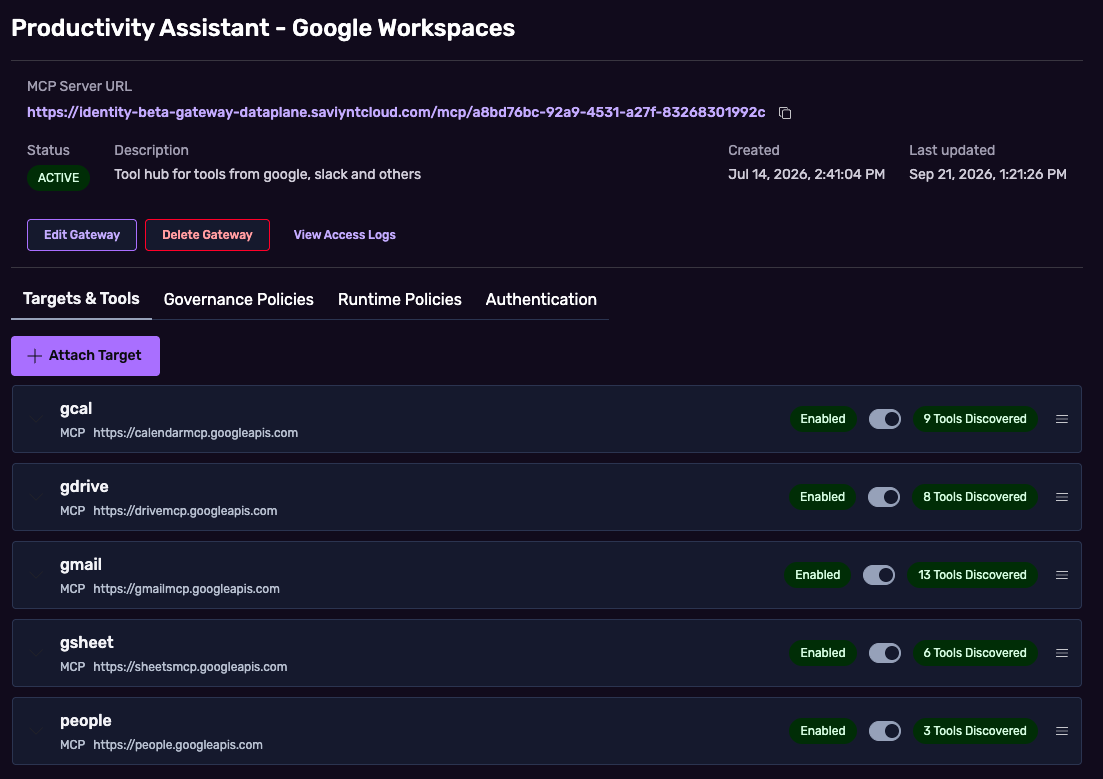
- Provision the gateways and attach MCP targets. Create a Google Workspace gateway with the Gmail, Drive and Calendar MCP targets (gmail, gdrive, gcal), and a Salesforce gateway with the Salesforce MCP target. Each gateway aggregates its targets' tools for the agent.
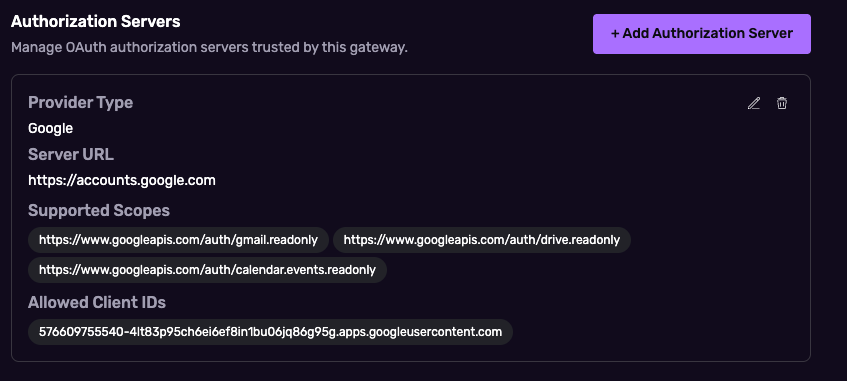
2. Configure authentication. Inbound auth is set per gateway: one or more trusted OAuth 2.0 identity providers, and the agent must present a token one of them issued. Outbound auth is set per target so the real user's identity flows through. For Google Workspace, the user's Google token is passed through to the MCP servers. For Salesforce, the gateway exchanges the user's enterprise token for a Salesforce delegation token, so CRM calls run with that user's record-level visibility.
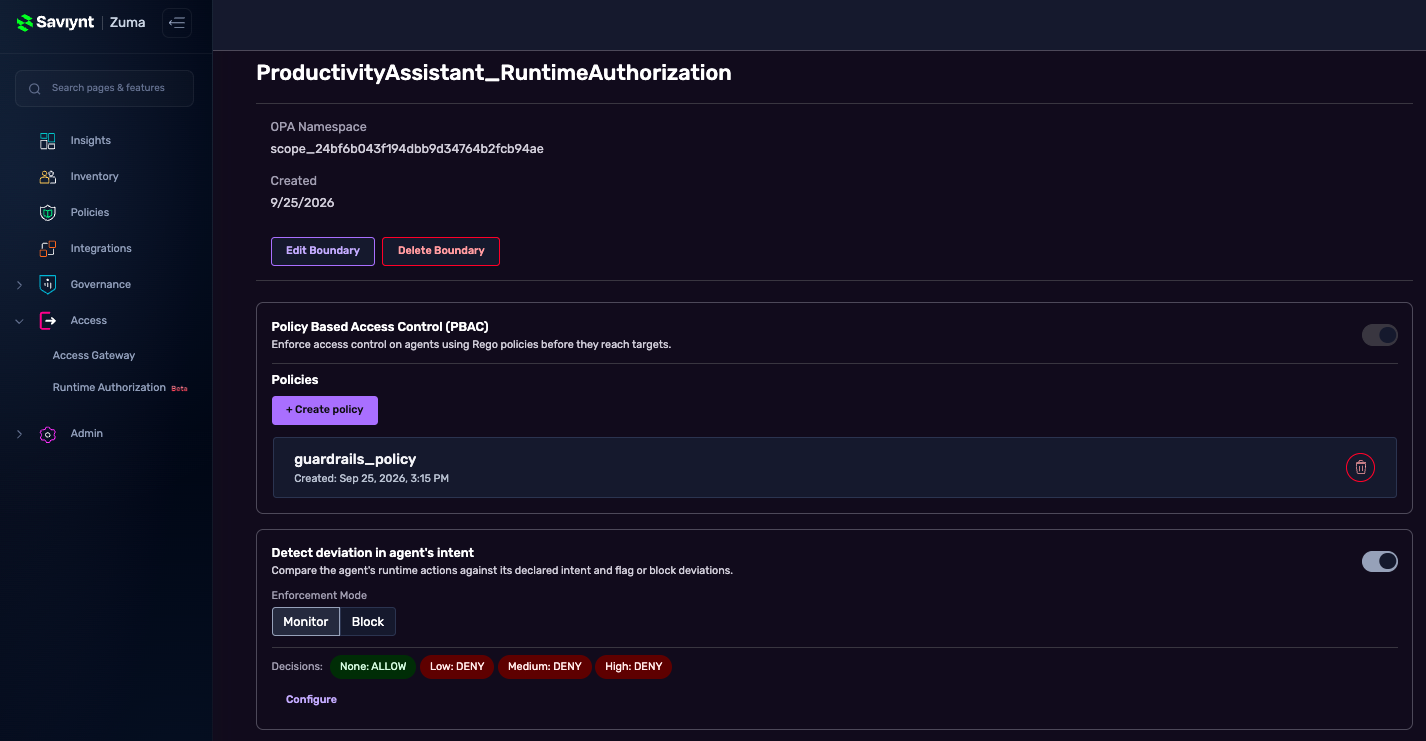
3. Create the authorization boundary. Group the four checks (PBAC, Intent Deviation, Anomaly Detection, Behavior Drift), set each one's mode, and attach the boundary to both gateways.
4. Connect the gateways in Copilot Studio. Add both gateways as tool connections on the agent. The first time a user invokes one, they authenticate through the gateway's inbound IdP, and that identity carries through every later tool call.
The policy behind Scenarios 1 and 2
The PBAC layer uses policies written in Rego. This one allows Google Workspace reads and scoped writes, denies drafts to anyone outside the company domain, allows Salesforce reads and single-record edits, and never allows Salesforce deletes.
For policy syntax and the attributes available at runtime, see the Zuma Access documentation.
To learn more about Zuma's approach to AI identity security, visit saviynt.com/zuma.