If your AI agents run on Google Cloud, you probably already have a gateway routing traffic from agent to anywhere. What you may not have is an authorization engine that tells it what is allowed and what is not.
So far in this series, Zuma has supplied both halves. In Post 1, we laid out a five-layer defense-in-depth model for AI agents. In Post 2, we watched Zuma's gateways stop an authorized agent three times, by policy, intent and anomaly. In Post 3, we pointed a pro-code agent on Amazon Bedrock AgentCore at those same gateways and got the same results.
But many teams aren't looking for another gateway. They've standardized on their cloud provider's. They want better decisions, not a second network path.
This post is for them. We take Google's managed Agent Gateway exactly as it ships and plug Saviynt's Runtime Decision Point Service (RDPS) into it. Google enforces. Saviynt decides. Every tool call an agent makes is checked against policy, intent and behavior before it reaches the backend, and nothing about your agent stack has to change.
Enforcing and deciding are two different jobs
Every authorization system does two things. It enforces: sitting in the traffic path and blocking or forwarding each request. And it decides: looking at the request and answering with allow or deny. The two don’t have to be bundled.
Google's Agent Gateway is built to enforce. It's the managed network entry and exit point for agents on Gemini Enterprise Agent Platform (formerly Vertex AI). When an agent is bound to a gateway in egress mode, every outbound tool call is routed through it transparently. Google runs the connectivity (Private Service Connect, private DNS) and the in-line enforcement, so you don't build or operate any of it. What the gateway needs is an authority to ask, on every call: should this go through?
RDPS is built to decide. It evaluates each tool call against the same layers you've seen throughout this series: policy-based access control (PBAC), intent deviation, and behavioral baselines. And because Zuma's services are modular, RDPS runs on its own. No Saviynt gateway required.
Put them together and each side performs a specific function:
| |
Google Agent Gateway
|
Saviynt RDPS
|
|
Role
|
Enforcement point
|
Decision point
|
|
Sits in the traffic path
|
Yes
|
Yes, called on by every request by the gateway
|
|
Owns
|
Connectivity, routing, block or forward
|
Policy, intent and behavioral evaluation
|
|
You operate
|
Configuration only (managed)
|
Boundary and policy setup
|
RDPS as a standalone decision point
RDPS doesn't sit in the network path as a proxy. Anything that can make an HTTPS request can ask it for a decision through a single contract:
Every decision call carries an OAuth 2.0 bearer token. RDPS validates it against the authentication providers configured on the boundary level before it evaluates anything. That's how your gateway proves to RDPS that it's allowed to ask.
Because the contract is plain HTTP, the same RDPS instance and authorization boundary can serve any number of gateway interceptors or custom modules. That's one decision authority and one set of policies, enforced at as many points as you need.
The bridge: a thin ext_proc
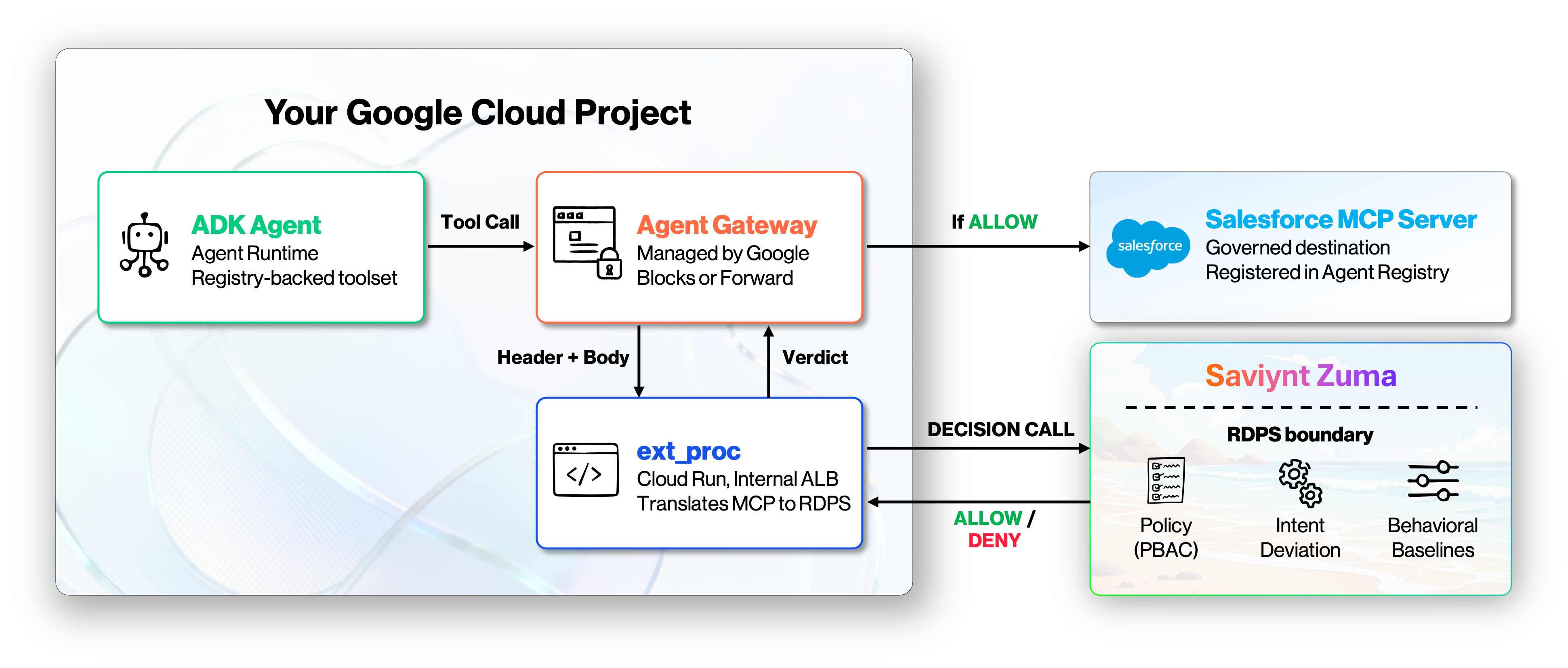
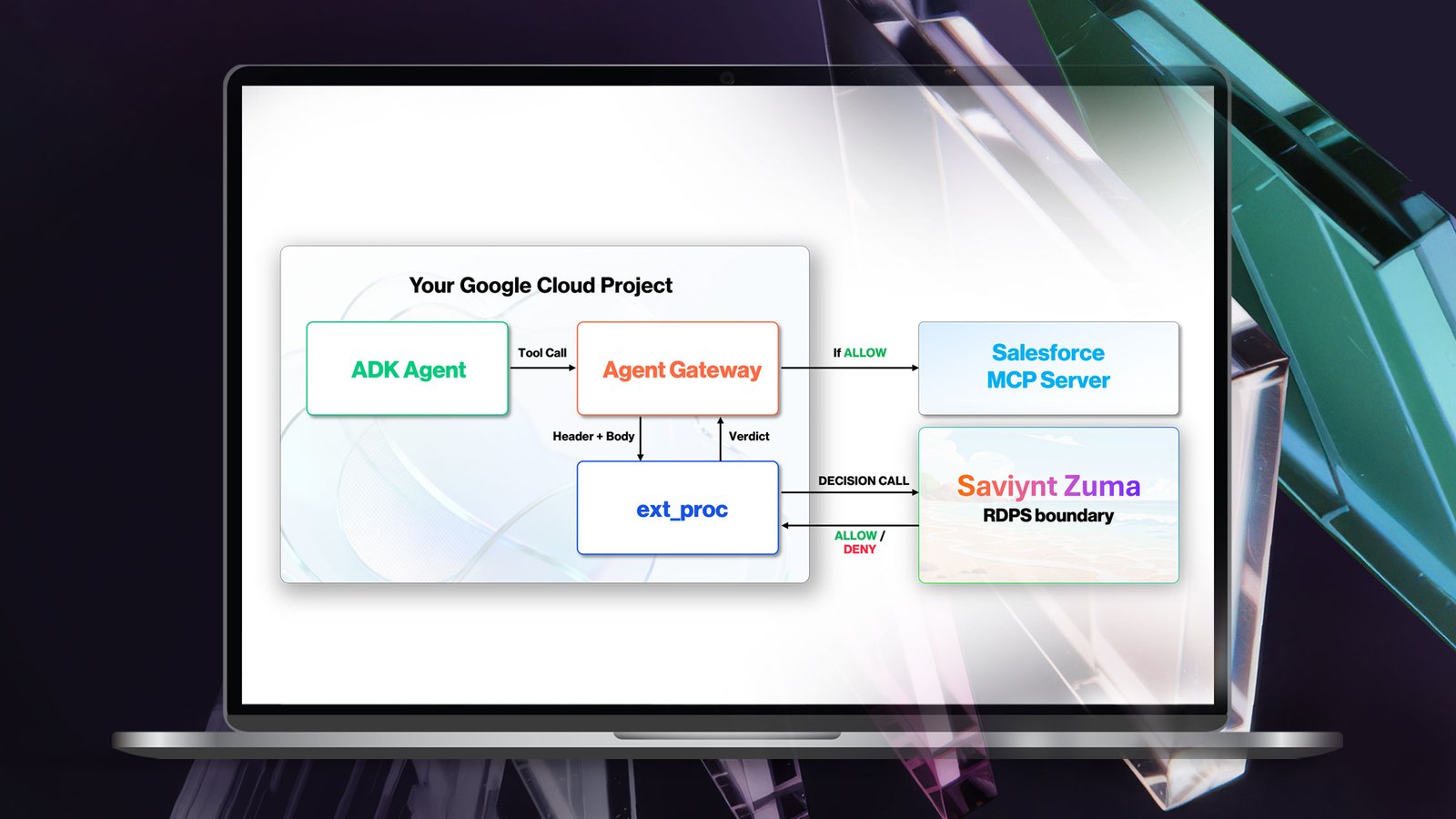
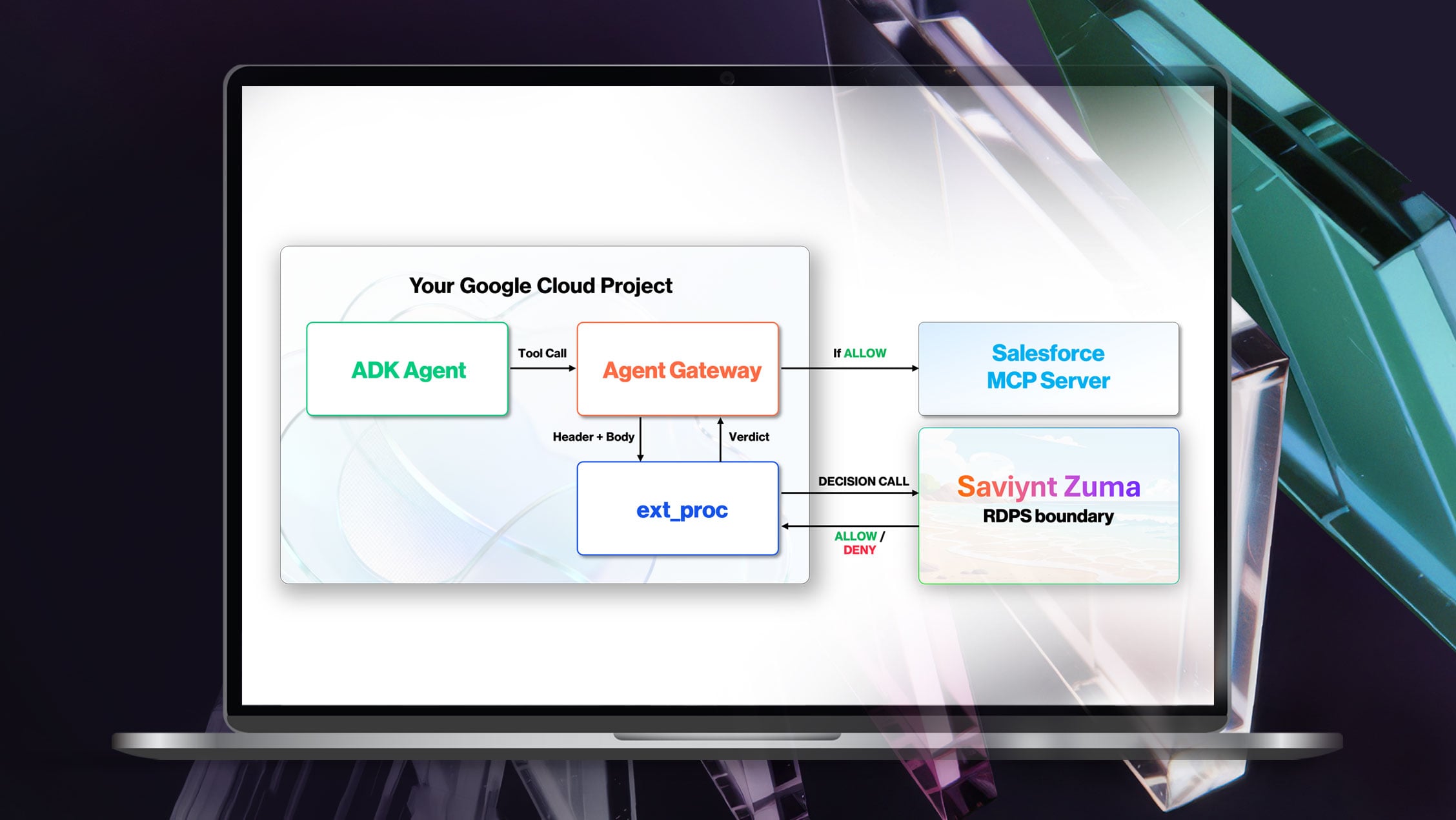
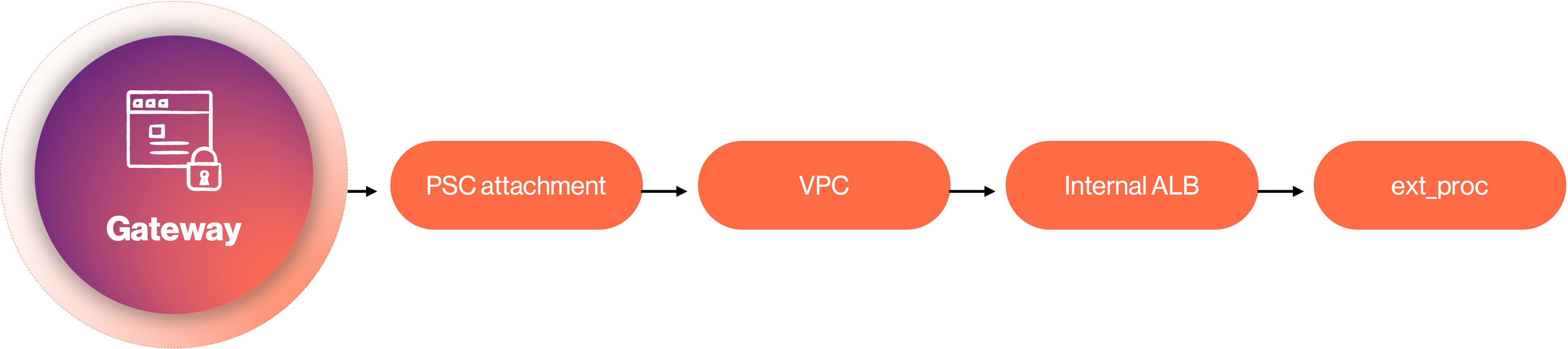
The tool call never leaves Google's path. Only the question "allow or deny?" travels to RDPS, and, in this instance, Salesforce, although it could be any target system sees the call only on ALLOW. The link between Google's gateway and RDPS is a small ext_proc (Envoy ExternalProcessor)- a gRPC service that the gateway streams each request to. The gateway sends headers and the full request body and waits for a verdict. The ext_proc:
- Parses the body as MCP JSON-RPC.
- Identifies tools/call messages (everything else — handshakes, tools/list, notifications — passes through).
- Authenticates to an OAuth2 provider and builds an RDPS decision request with the tool name, arguments, destination, identity, and the bearer token.
- Calls RDPS and maps the result: ALLOW releases the buffered body so the gateway forwards the call; DENY returns and unauthorized response.
The ext_proc is intentionally thin. All the policy logic, intent analysis, and anomaly detection live in RDPS.
Part 1: Set up the authorization (once, in RDPS)
The decision side comes first. It takes three steps, done once, independent of GCP.
- Create the authorization boundary. Enable the categories to evaluate. The boundary returns an id the ext_proc uses on every decision call (RDPS_BOUNDARY_ID).
- Configure the OAuth2 authentication provider. Register the trusted issuer RDPS accepts tokens from. Each decision request's bearer token is validated against it before any policy runs. Because RDPS trusts the issuer, the same provider works for any enforcement point that can present a token from it.
- Create the policy. Attach a Rego policy scoped to the boundary. Here's a simple one that denies the write and delete tools, allowing everything else (read):
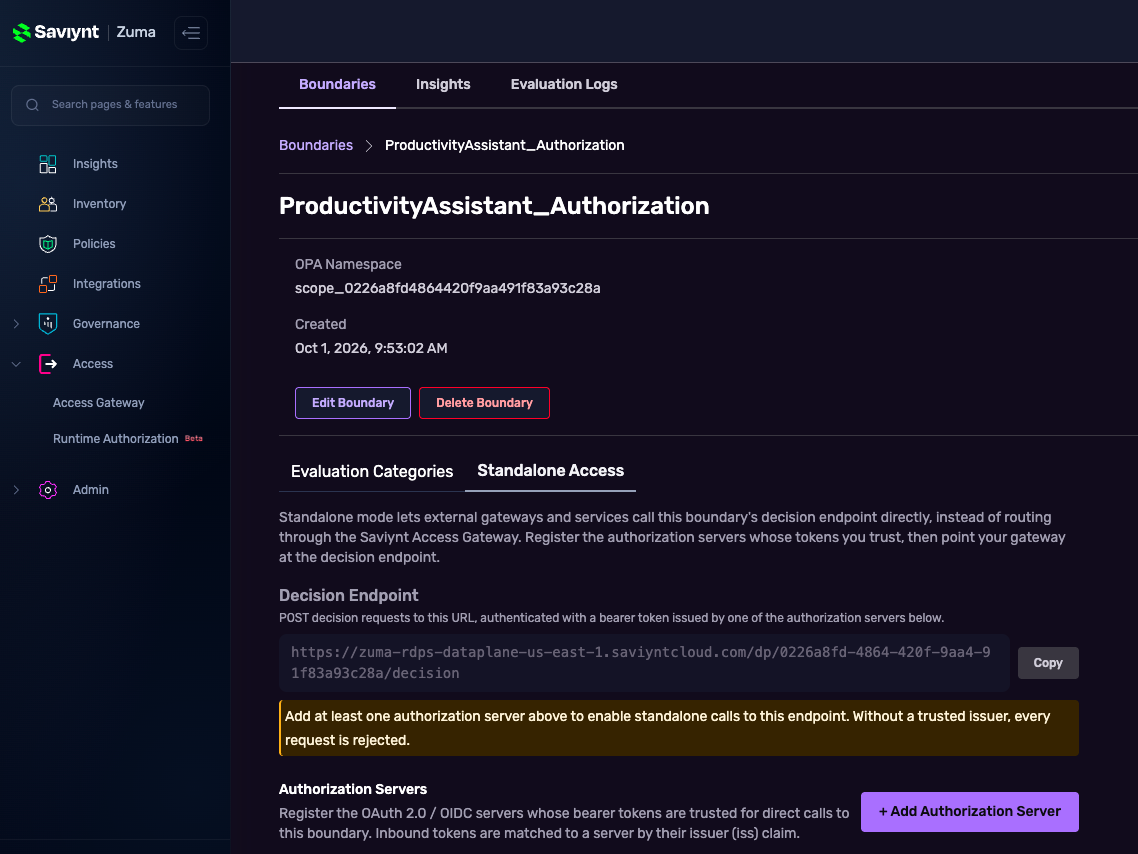
With the boundary, provider, and policy in place, RDPS is ready to answer decisions. Everything from here is on the GCP side: standing up the enforcement path that calls it.
Part 2: Build the enforcement path on Google Cloud
The example uses an ADK agent on Agent Runtime whose tool is the Salesforce Platform MCP server (sobject-all), bound to an egress Agent Gateway that delegates decisions to the ext_proc. Resource names use a gcp-rdps-demo- prefix.
Prerequisites
- A GCP project with the agent platform, Cloud Run, networking, DNS, and registry APIs enabled.
- Access to create resources across the services this build touches: Vertex AI (Agent Engine), Cloud Run, Compute (VPC, PSC, and especially load balancing), Cloud DNS, the Agent Registry, Artifact Registry, and Cloud Build.
- A reachable Zuma RDPS data-plane URL and a boundary with authentication provider configured.
Step 1 — Private networking
The gateway reaches the ext_proc over a Private Service Connect path into your VPC. Create a VPC, a small subnet with Private Google Access, a PSC network attachment (the gateway's egress interface), and a PSC endpoint to all Google APIs. Add private DNS zones for run.app., googleapis.com., and p.googleapis.com. pointing at the PSC address
Step 2 — Deploy the ext_proc behind an internal load balancer
Deploy the ext_proc to Cloud Run with HTTP/2 enabled and the RDPS environment variables set (RDPS_DATAPLANE_URL, RDPS_BOUNDARY_ID, RDPS_TENANT_ID). The gateway can't reach a raw *.run.app host over PSC, so front it with a regional internal Application Load Balancer: a serverless NEG, an INTERNAL_MANAGED HTTP/2 backend, a URL map, a self-signed cert, an HTTPS proxy, and a forwarding rule on :443. Add a DNS A record for the ext_proc FQDN pointing at the load balancer's internal IP.
Watch out: this step needs load-balancing permissions (serverless NEGs, backend services, forwarding rules) on top of Cloud Run access. Check them before you start, or the build stops here.
Step 3 — Register the MCP tool server in the Agent Registry
Register the Salesforce MCP server as an mcpServer or service in the global Agent Registry with its interface URL and protocolBinding=JSONRPC. Note the resulting resource name (projects/<proj>/locations/global/mcpServers/<id>) — you'll need it in Step 5.
This is what makes the gateway treat api.salesforce.com as a governed destination. Without the registry entry, the agent's tool-call traffic goes directly to Salesforce and bypasses the gateway - which means RDPS never sees the call.
Step 4 — Create the gateway with two authorization policies
Create the AGENT_TO_ANYWHERE Agent Gateway (protocols [MCP], referencing the global registry), with network config pointing at the PSC attachment and DNS peering for run.app. into your VPC.
Then attach two authorization policies. Keeping them separate matters:
- An IAP policy (REQUEST_AUTHZ, DRY_RUN, failOpen=true) for the agent's own foundational egress — session creation, model calls, token endpoints.
- An RDPS policy (CONTENT_AUTHZ, pointing at the ext_proc, failOpen=false) for tool calls. Fail-closed means a denied tool call is truly blocked.
Step 5 — Deploy the agent with the registry-backed toolset
Deploy the ADK agent to Agent Engine, bound to the gateway in egress mode with AGENT_IDENTITY. The critical wiring: build the toolset from the Agent Registry mcpServer resource, not a raw URL.
Inside the ext_proc: calling RDPS and acting on the decision
We saw the policy earlier. Here's the other half — how the ext_proc turns an intercepted tool call into an RDPS decision and enforces the result. (Snippets are condensed for illustration)
First, build the decision request from the intercepted MCP tools/call and POST it to the boundary's decision endpoint, carrying the OAuth2 bearer token:
Finally, the gateway side acts on that verdict. On ALLOW, the gateway forwards the call; on DENY the ext_proc returns unauthorized error.
Same agent, same credentials, same gateway. The only thing that changed is the action, and that's exactly what runtime authorization is meant to catch.
Decide once, enforce anywhere
Four posts in, the pattern is clear. The agent can change: low-code in Post 2, pro-code in Post 3. The enforcement point can change too: Zuma's gateways in Posts 2 and 3, Google's Agent Gateway here. What stays constant is the decision. The same boundary, the same policies and the same intent and behavioral checks govern every call.
That matters because no enterprise will run a single agent stack. Some teams will standardize on a cloud provider's gateway, some on Zuma's, some on an API gateway they already own. If every enforcement point carries its own policy logic, you write the same rules several times and the gaps between them become the attack surface.
Separating the decision from the enforcement removes that problem. Google's Agent Gateway supplies managed network enforcement and an extension point for delegated authorization. RDPS supplies content-aware, intent-aware runtime decisions. A thin ext_proc connects them. Each component does what it's built for, and the defense-in-depth model from Post 1 now runs on Google's agent platform without a second gateway.
With Zuma, you discover every agent (Insights), govern its lifecycle (Governance) and authorize every action at runtime (Access), wherever that action is enforced.
Learn more about Zuma.